HDMI has a dirty secret: it was never designed for long runs. Past a certain length the signal doesn’t fade gracefully like old analog video did. It falls off a cliff, and you get sparkles, dropouts, or a black screen. The good news is that every distance problem has a known fix, and none of them require guesswork. You just need two numbers: how far the cable has to travel, and what resolution it has to carry.
Here’s the whole decision, then the details on each option.
The Short Answer: Match the Solution to the Distance
| Run length | Best solution | Watch out for |
|---|---|---|
| Up to 25 ft | A certified passive cable | Nothing. Just buy the right tier. |
| 25 to 50 ft | Passive works for 1080p; 4K wants an active cable | Uncertified “50 ft 4K” claims |
| 50 to 100 ft | Active HDMI cable or an inline booster | Active cables are directional |
| 100 to 330 ft | HDMI over Cat6 extender (HDBaseT at the top end) | Needs its own Ethernet run |
| Beyond 330 ft | Fiber optic HDMI or a fiber extender | Cost, and directional connectors |
| No cable possible | Wireless HDMI | Latency and compression |
Why Long HDMI Runs Fail
Three things kill an HDMI signal over distance. The first is attenuation: copper resists the signal, and the higher the bandwidth, the shorter the reliable run. That’s why a cable that’s fine at 1080p can fail the moment you feed it 4K HDR. The second is interference. HDMI is shielded, but a long run laid parallel to power cables or draped over a furnace can pick up enough electrical noise to cause flicker and pixelation. The third is the HDCP handshake: every extra connector, adapter, and wall plate in the chain is another place for the copy-protection conversation between your devices to stall and give you a blank screen.
The practical takeaway: a long run fails at the weakest point in the chain, so solve for total distance and skip the chain of couplers.
Passive Cables: Fine to 25 Feet, Honest to 50
An ordinary certified cable needs no help at typical room distances. For 4K@60 with HDR, treat 25 feet as the sensible ceiling for passive copper. At 1080p you can stretch to around 50 feet reliably. The trick is buying a cable actually certified for the bandwidth you need, which is exactly the topic of our guide to the five HDMI cable types. For specific long-run picks, our long 4K HDMI cable roundup covers cables that hold their rating at length.
Active HDMI Cables: Copper With a Built-In Boost
Active cables hide a small amplifier chip in one connector and draw power from the HDMI port itself. That buys you reliable runs to around 100 feet without any extra boxes. Two things bite people: active cables are directional, so the marked end must go in the display or the source exactly as labeled, and quality varies more than with passive cables, so buy tested brands. We’ve had good results with BlueRigger’s boosted long cables; our 75 ft BlueRigger signal booster review covers one we’d actually install.
Boosters and Repeaters: Rescue an Existing Run
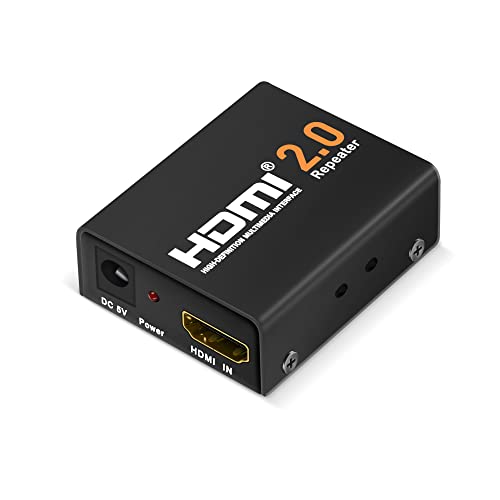
A booster (or repeater) is a small inline box that re-amplifies the signal mid-run or at the display end. It’s the cheapest fix when a run you already installed turns out to be marginal, and modern HDMI 2.1 boosters carry 1080p to roughly 160 feet and 4K a good deal shorter. Buy one powered by USB or an adapter rather than bus power alone; five sources and a long cable ask more than an HDMI port wants to give.
HDMI Over Cat6 and HDBaseT: The In-Wall Workhorse

Extenders that convert HDMI to run over Ethernet cable are the standard answer for long in-wall installs. A transmitter converts the signal, an ordinary Cat6 run carries it, and a receiver converts it back. Budget units handle 130 to 230 feet; HDBaseT, the certified professional version of the same idea, is rated to 100 meters (328 feet) and usually powers the far end over the same cable. Two caveats: the Ethernet run should be dedicated (this is not the same as your network), and cheap units sometimes compress 4K. If the spec sheet won’t say “uncompressed,” assume it isn’t.
Fiber Optic HDMI: For When Copper Gives Up
Active optical HDMI cables and fiber extenders convert the signal to light, which makes distance and interference almost irrelevant. Consumer optical cables run 330 feet and beyond, immune to EMI, at a fraction of the thickness of long copper. The trade-offs are price, directional connectors, and less tolerance for sharp bends and rough handling during the pull. For a projector at the far end of a large room, or anything across a building, this is the clean answer.
Wireless HDMI: The Compromise Option
Wireless HDMI kits work, within limits: figure 30 to 100 feet with a clear line of sight, some visible compression on demanding content, and enough latency that we’d never game through one. For a conference room slideshow or a TV where no cable can go, fine. For a home theater you care about, run the cable.
Keeping the Signal Clean

- Route away from power. Don’t lay HDMI parallel to electrical cable; cross at right angles if you must.
- Skip the couplers. Every joint is a handshake risk. One continuous cable beats two cables and an adapter.
- Buy certified, not “supports 4K.” The certification tier, not the marketing copy, is what holds at length.
- Add ferrite cores near the connectors if you see flicker in an electrically noisy room.
- For gaming, keep it copper or fiber. Wireless and heavy compression cost you frames; see our gaming cable guide.
FAQ
Why does my HDMI signal keep dropping out?
Usually a loose connector, a marginal cable at its distance limit, or an HDCP handshake stall. Reseat both ends, try a shorter or certified cable, and remove any couplers or adapters from the chain. If the dropouts happen only on protected 4K content, the weak link is HDCP, not picture bandwidth.
My HDMI cable is too long and the picture sparkles. What now?
Sparkles are attenuation. Add an inline booster at the display end, step down the resolution, or replace the run with an active or fiber cable. Past 100 feet, go straight to a Cat6 extender or optical cable rather than stacking boosters.
How do I stop interference from affecting my HDMI signal?
Use a well-shielded certified cable, route it away from power lines and appliances, and clip a ferrite core near each connector if flicker persists. If the environment is hopelessly noisy, fiber optic HDMI is immune to EMI entirely.
Can I game over a long HDMI run?
Yes, if it’s copper or fiber. Active cables, boosters, and uncompressed extenders add no meaningful latency. Avoid wireless HDMI and anything that compresses the signal.
The Bottom Line
Measure the run, note the resolution, and read the table again. Under 25 feet, buy a good passive cable and move on with your life. To 100 feet, active copper. In the walls, Cat6 or HDBaseT. Past that, fiber. The only wrong answer is hoping a bargain 75 foot passive cable will carry 4K, because that’s the one solution physics has already vetoed.