
There are exactly five official HDMI cable types, and they’re defined by bandwidth, not by brand, price, or the gold plating on the connector. Buy the wrong tier and your 4K/120Hz TV quietly falls back to 60Hz. Buy a higher tier than you need, and you’ve just donated money to a cable company.
Here’s every certified type, what it actually carries, and a simple way to pick the right one for your gear.
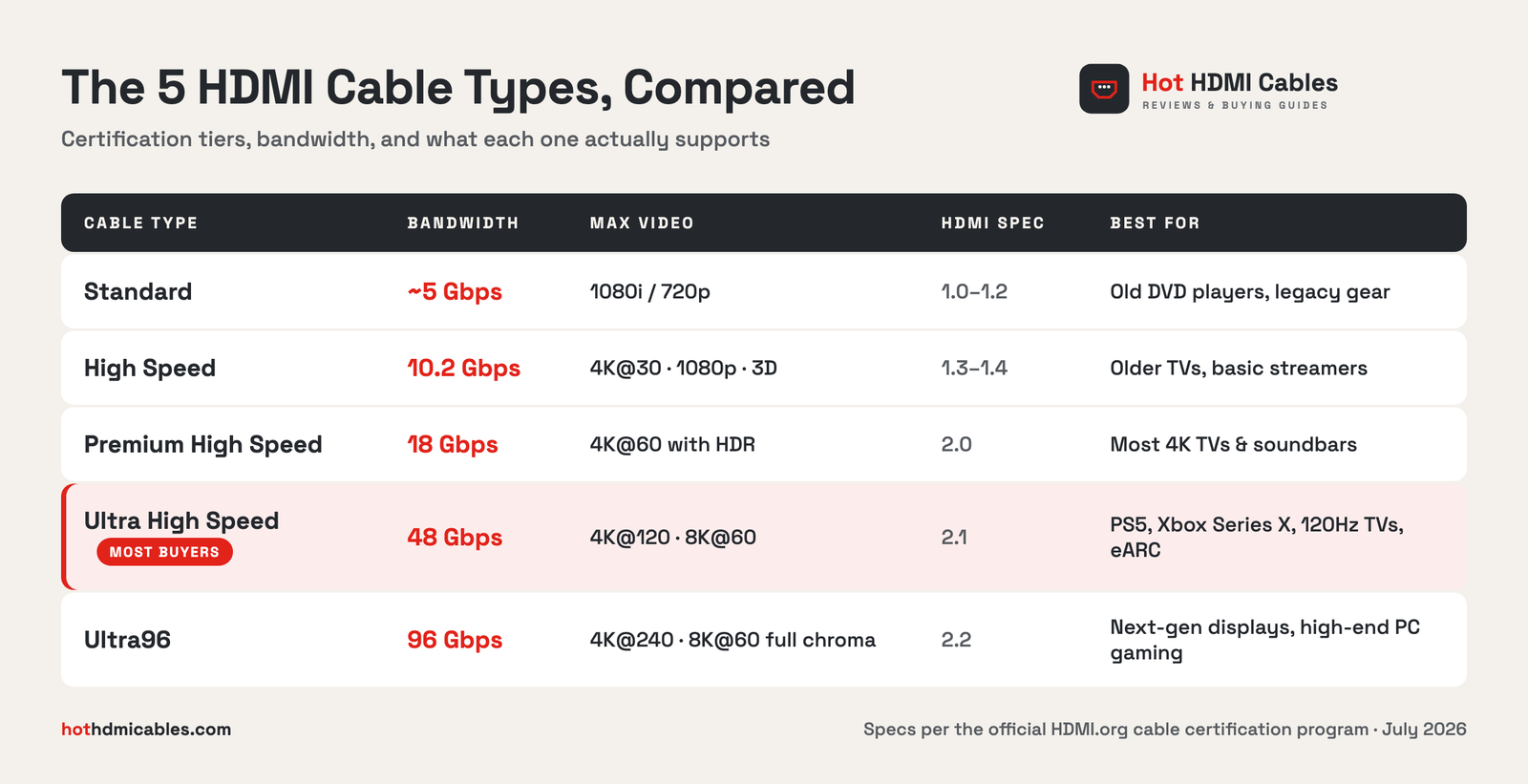
If you skim one thing on this page, make it that table. Everything below is detail.
Standard HDMI Cables
The original. Standard cables reliably carry 1080i or 720p and nothing more. Nobody has manufactured much of anything that needs one since the early 2010s, but they still lurk in junk drawers and behind old cable boxes. If a mystery cable came with a device before 2010, assume it’s this, and don’t use it on a 4K TV.
High Speed HDMI Cables
High Speed cables handle 10.2 Gbps: enough for 1080p, 3D video, Deep Color, and 4K at a ceiling of 30Hz. That 30Hz limit is the trap. A 4K movie at 24 frames per second looks fine, but 4K sports, games, or even a snappy menu will stutter or force the TV down to 1080p. Fine for an older Roku on a 1080p set. Not fine as your main living room cable in 2026.
Premium High Speed HDMI Cables
This is the first tier with a real certification program. Premium High Speed cables are tested to a full 18 Gbps and carry 4K@60 with HDR and wide color (BT.2020), plus low-EMI shielding so they don’t interfere with nearby wireless gear. Genuine ones wear an anti-counterfeit certification label with a QR code you can scan to verify.
For most people with a 4K TV, a streaming stick, and a soundbar, this tier is the sweet spot. [INTERNAL LINK: /which-hdmi-cable/ “Our cable buying guide”] walks through specific picks.
Ultra High Speed HDMI Cables
The current mainstream ceiling: 48 Gbps, built for the HDMI 2.1 feature set. That means 4K@120, 8K@60, eARC for lossless audio to a soundbar or AV receiver, and the variable refresh rate modes gamers care about. Sony ships one in the PS5 box; Microsoft does the same with Xbox Series X.
Two honest notes. First, you only benefit if the devices on both ends support these features. An Ultra High Speed cable will not make an old TV faster. Second, counterfeits are common, so check for the official QR certification label before buying. We tested a certified budget option in our [INTERNAL LINK: /9to5-cables-review “9To5 Cables Ultra High Speed review”].
Ultra96 HDMI Cables
The newest tier, introduced with the HDMI 2.2 specification in 2025. Ultra96 doubles bandwidth to 96 Gbps, enough for 4K@240 and 8K@60 with full 4:4:4 chroma at 10- and 12-bit color. Displays that need this barely exist yet outside high-end PC monitors, so treat Ultra96 as future-proofing, not a required upgrade. Like the two tiers below it, real ones carry a scannable QR label on the jacket.
Connector Sizes Are Not Cable Types
A common mix-up: micro HDMI is a connector shape, not a speed tier. Any of the five types above can, in principle, ship with different plugs.
- Type A (Standard): the full-size plug on TVs, consoles, and receivers.
- Type C (Mini): older DSLRs and camcorders.
- Type D (Micro): action cameras, some tablets and single-board computers.
- Type E (Automotive): a locking, vibration-resistant plug used in cars.
So “micro HDMI cable” answers what fits the port. You still need to check which speed tier the cable is rated for.
Which HDMI Cable Do You Need?
Match the cable to the most demanding device in the chain:
- PS5, Xbox Series X, or a 120Hz TV: Ultra High Speed. No debate.
- 4K TV with streaming and a soundbar: Premium High Speed covers everything; Ultra High Speed if you use eARC for Atmos.
- 1080p TV or an older streaming box: High Speed is genuinely enough. Save the money.
- In-wall runs: buy the speed tier you need with a CL2 or CL3 fire rating on the jacket. That rating is a safety requirement for in-wall installation, not a performance spec.
- Runs over about 10 feet at 48 Gbps: consider an active or optical HDMI cable. Passive copper gets unreliable at high bandwidth over long distances.
One more thing worth saying plainly: past the correct certification tier, expensive cables do not produce a better picture. HDMI is digital. The signal either arrives intact or it visibly fails with sparkles and dropouts. A $12 certified cable and a $90 certified cable of the same tier deliver identical images.
How to Spot a Real Certified Cable
Premium High Speed, Ultra High Speed, and Ultra96 cables sold legitimately carry a certification label with a hologram and QR code from HDMI Licensing. Scan the code with the official HDMI Cable Certification app and it should confirm the product. No label, or a label that fails the scan, means you’re likely holding a counterfeit, and counterfeits are exactly the cables that flake out at 4K@120. [EXTERNAL LINK: HDMI.org official cable types page, as the authoritative spec source]
FAQ
Do I need an Ultra High Speed HDMI cable for PS5 or Xbox Series X?
Yes, if you want 4K@120 or VRR on a capable TV. Both consoles include one in the box, so replace it like-for-like if you lose it.
Are expensive HDMI cables worth it?
No. Certification tier matters; price and brand prestige don’t. A cheap certified cable performs identically to a luxury one at the same tier.
How do I tell which HDMI cable I already have?
Check the jacket printing for “High Speed,” “Premium,” “Ultra,” or a certification label. Unlabeled cable? Test it: if 4K@60 HDR plays without dropouts, it’s performing at Premium level regardless of what it is.
Does a long HDMI cable lose quality?
Not gradually. Digital signals work until they don’t. Passive cables are dependable to about 10 feet at 48 Gbps; beyond that, use an active or fiber-optic HDMI cable.
What is HDMI 2.2 and do I need an Ultra96 cable?
HDMI 2.2 is the 2025 spec that raises bandwidth to 96 Gbps. Until you own a display that exceeds 4K@120, an Ultra High Speed cable does everything you need.
Bottom Line
Five types, one rule: match the cable’s certification tier to the most demanding device you own, verify the QR label, and ignore the marketing. For specific tested picks at each tier, read our latest HDMI cable reviews.